

Agility Blue January 2026 Update

What's New?
Advanced Grid Filters
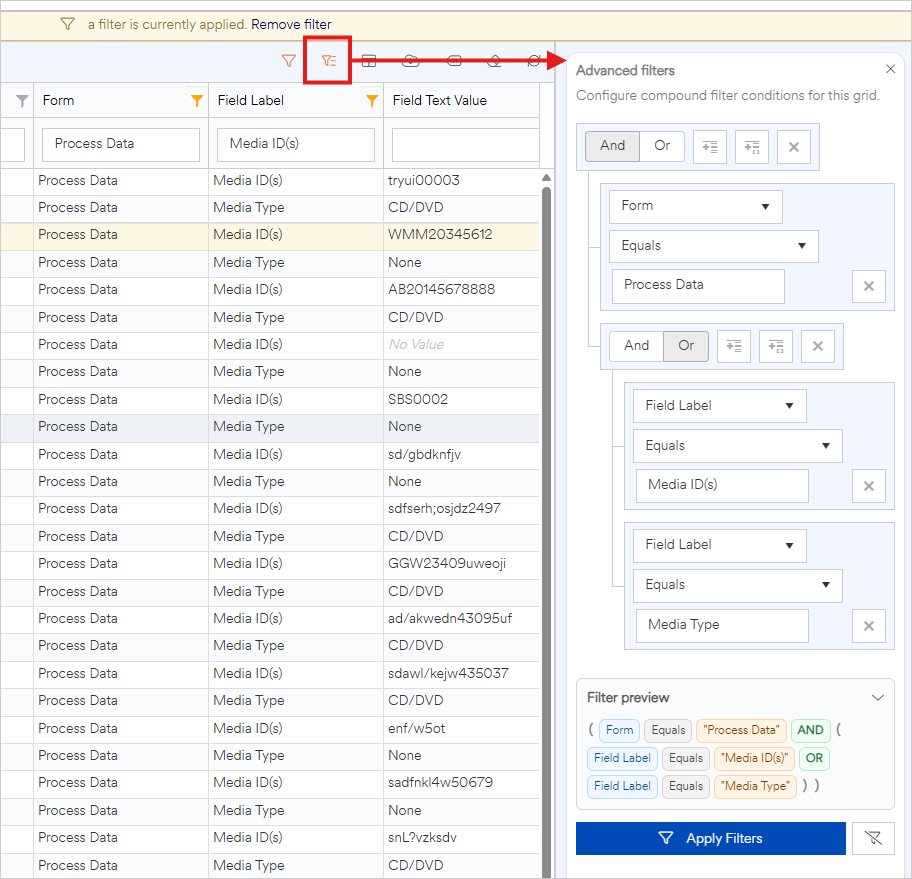
We've introduced advanced grid filters to let you build powerful, precise filters across most grids in Agility Blue, with no limit on the number of expressions per field and support for grouping conditions. They work alongside standard grid filters and provide a clear, human-readable preview of the active filters.
Portal Updates
Password field property types are now masked in both the portal and the main application when tasks are created from the portal.
Additional conditions have been added to the following field types that mirror the main application's behavior:
Basic text fields:
Text is not exactly
Text does not contain
Rich text fields:
Text does not contain
Number fields:
Number is not exactly
Date fields:
Date is not on
Choice fields:
Choice is not exactly
You can now use reference fields in conditional fields that affect other field properties that mirror the main application's behavior. Reference fields allow for the following conditions:
Any value. True if there is any reference object entries selected.
No value. True if there are no reference object entries selected.
Choice is exactly. True if the defined list of object entries are selected.
Choice is not exactly. True if the defined list of object entries are not selected.
Choice is any of. True if any of the defined object entries are selected.
Choice is none of. True if none of the defined object entries are selected.
Display value contains. True if the display value of the selected object entries contain the entered text (case-sensitive).
Display value does not contain. True if the display value of the selected object entries do not contain the entered text (case-sensitive).
Other Enhancements
Added the ability to detect and extract email bodies that are stored as attachments for inbound email.